Kiso: Reproducible Edge-to-Cloud Experimentation Made Simple
What is Kiso?
Running experiments across distributed computing environments – edge devices, cloud instances, academic testbeds – has traditionally required researchers to write extensive custom scripts for provisioning resources, installing software, managing execution, and collecting results. Each testbed comes with its own APIs, authentication flows, and quirks, and the burden of orchestrating all of it falls squarely on the researcher.
Kiso is an open-source, config-driven experiment management framework that eliminates this infrastructure overhead. Developed by the SciTech Research Group at USC’s Information Sciences Institute – the same team behind the Pegasus Workflow Management System – Kiso lets researchers declaratively define their experiments in a single YAML file and then run them across one or more testbed environments with just a few commands. Whether you are working with FABRIC, Chameleon, or local Vagrant VMs, Kiso handles the complexity so you can focus on your science.
The Problem Kiso Solves
Before Kiso, a typical workflow for running an experiment on an academic testbed looked something like this: write Bash or Python scripts to provision virtual machines, write more scripts to install Docker or Apptainer and pull container images, write yet more scripts to configure HTCondor or another workload manager, write a script to actually launch the experiment, write a script to wait for completion and download results, and finally write a teardown script to release the resources. If you needed to run on a second testbed, you rewrote much of this from scratch because each platform has different APIs and conventions.
Kiso replaces all of that with a single YAML configuration and a three-command workflow:
# Install Kiso
$ pip install kiso[all]

# Define your experiment in YAML
$ vim experiment.yml

# Provision resources across multiple testbeds
$ kiso up

# Run across multiple testbeds
$ kiso run

# Deprovision resources
$ kiso down
How Kiso Works: The Experiment Lifecycle
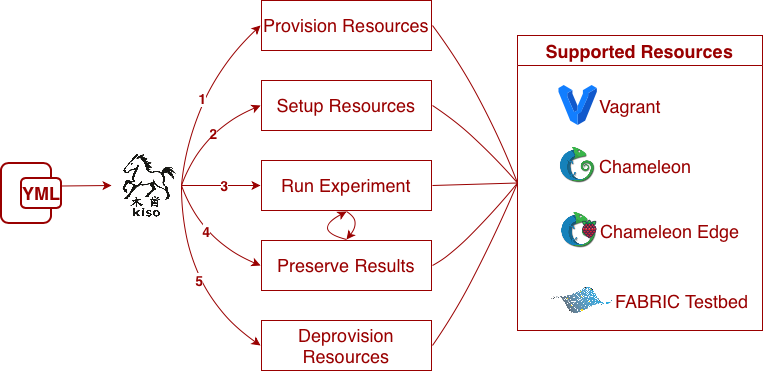
Kiso manages the complete experiment lifecycle through four cleanly separated phases, all driven by a single configuration file.
Phase 1: Provision Resources
Kiso declaratively provisions computing resources across one or more supported testbeds. It handles authentication, allocation, and configuration across diverse infrastructure providers. Supported testbeds currently include FABRIC, Chameleon (both bare metal and edge), and Vagrant for local development and testing.
Phase 2: Install and Configure Software
Once resources are up, Kiso automatically installs and configures the required software stacks. Built-in support covers Docker, Apptainer, and Ollama (for running local large language models), as well as HTCondor for distributed workload management and Pegasus for workflow execution. Researchers can also run custom shell-based setup scripts for anything not covered by the built-in plugins.
Phase 3: Execute Experiments
Kiso currently supports two experiment types: Shell experiments (arbitrary scripts executed on provisioned nodes) and Pegasus workflow experiments (full scientific workflow execution with built-in support for planning, submission, monitoring, and result staging). Experiments run in a controlled, repeatable manner across whatever infrastructure has been provisioned.
Phase 4: Collect Results
After execution completes, Kiso automatically collects results from all distributed resources back to a central location on the researcher’s machine for easy analysis and sharing.
Built-in Pegasus Integration
Kiso was designed with first-class support for Pegasus workflows. For researchers already using Pegasus to define their computational pipelines, Kiso provides the missing layer: automated provisioning of the infrastructure that Pegasus runs on. A typical Kiso configuration for a Pegasus experiment will provision nodes on FABRIC or Chameleon, install HTCondor and Pegasus, deploy the workflow, monitor execution, and retrieve results – all from one YAML file.
This integration is particularly powerful for multi-testbed experiments. Kiso can provision an HTCondor central manager on one testbed and worker nodes on another, creating a unified computing pool that spans multiple environments. The Pegasus workflow then runs across this distributed pool transparently.
Real-World Experiment Examples
Kiso ships with a growing gallery of example experiments that demonstrate its capabilities across different domains and testbed configurations.
Plankifier – Deep Learning for Ecosystem Monitoring
The Plankifier experiment uses deep learning to classify freshwater plankton images, automating ecosystem monitoring at scale and replacing costly manual microscopic annotation. This experiment runs on Chameleon bare-metal nodes, leveraging GPU resources for model training and inference.
Orcasound – Real-Time Orca Detection
The Orcasound experiment processes live hydrophone audio from sensors across Washington state to detect orca whale calls using automated ML pipelines. Designed as a Vagrant-based experiment, it demonstrates how Kiso can orchestrate complex audio-processing and classification workflows locally before scaling to cloud testbeds.
COLMENA – Hyper-Distributed Agent Swarms
The COLMENA experiment demonstrates hyper-distributed agent swarms across heterogeneous edge devices, coordinated as a unified computing platform that spans the full compute continuum. Running on FABRIC, it showcases Kiso’s ability to manage complex multi-node deployments with diverse software requirements.
Pydantic AI Agents
Kiso includes templates for running AI agent workloads on provisioned infrastructure. These experiments spin up Ollama with a local LLM and deploy Pydantic-based agents that return structured output – showing how Kiso can manage the emerging class of agentic AI experiments alongside traditional scientific workflows.
Extensibility by Design
Kiso uses a plugin architecture that makes it straightforward to add support for new testbeds, software runtimes, deployment types, and experiment orchestrators. Each extension point has a well-defined interface, and the project documentation includes step-by-step guides for contributing new plugins. This means that as new testbed environments or execution engines emerge, Kiso can grow to support them without changes to the core framework.
Try It Yourself: Running Your First Kiso Experiment
Getting started with Kiso takes just a few minutes:
1. Install Kiso:
pip install kiso[all]
2. Clone a starter template:
git clone https://github.com/pegasus-isi/kiso-experiment-template.git
cd kiso-experiment-template
3. Edit the experiment configuration to match your testbed credentials and experiment requirements.
4. Run the experiment:
kiso up # Provision resources

kiso run # Execute the experiment

kiso down # Release resources
5. Examine results in the local output directory.
For a detailed walkthrough, visit the first experiment tutorial in the Kiso documentation.
Relevant Links
- Kiso Website
- Kiso Documentation
- Kiso GitHub
- Kiso on PyPI
- Introduction Video
- Pegasus WMS
- SciTech Research Group
Acknowledgements
This work is funded by the National Science Foundation under grant [2403051] – OAC Core: Edge to Cloud Workflows: Advancing Workflow Management in the Computing Continuum.