We are excited to announce that Pegasus Workflow Management System now supports the NERSC Superfacility API (SFAPI), enabling scientists to submit and manage workflows on the Perlmutter supercomputer directly from their submit host — no SSH tunnels, no batch system logins required.
What Is the Superfacility API?
The Superfacility API (SFAPI) is a secure REST-over-HTTPS interface that allows external software to interact with NERSC HPC systems programmatically. Rather than relying on traditional grid middleware or SSH-based job launchers, SFAPI provides a modern, credential-based mechanism for submitting Slurm jobs, staging data, polling job status, retrieving outputs, and cancelling jobs — all over standard HTTPS.
Why This Matters?
Large-scale scientific workflows have historically required complex middleware stacks and persistent network connections to HPC systems. SFAPI removes those dependencies. Researchers working on ACCESS allocations at NERSC can now
- Submit from anywhere — your laptop, a campus cluster, or a cloud VM
- Avoid VPN and SSH key management for workflow job submission
How Pegasus Integrates with SFAPI
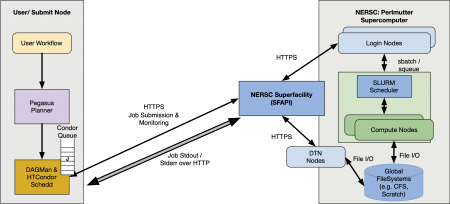
Pegasus connects to Perlmutter through a BLAHP (BLAH Plug-in) that wraps the sfapi_client Python library. When a workflow job is ready to run, HTCondor invokes the SFAPI BLAHP, which:
- Uploads input files to Perlmutter’s GPFS filesystem via the SFAPI data transfer endpoints
- Submits a Slurm job on your behalf using your registered SFAPI credentials
- Polls job status over HTTPS until completion
- Downloads outputs back to your submit host
- Cancels jobs if the workflow is aborted
From the perspective of the Pegasus planner and HTCondor, Perlmutter appears as just another compute site — all the complexity of the SFAPI interaction is hidden inside the BLAHP layer.
What You Need to Get Started?
- SFAPI Credentials:Register an SFAPI client at https://iris.nersc.gov with Red security level (enabling up to 2-day job submissions) and the compute:perlmutter and compute:dtns scopes. Store the resulting credentials at:
~/.superfacility/clientid.txt
~/.superfacility/priv_key.jwk
~/.superfacility/pub_key.jwk
Set permissions to chmod 600 on all three files. - A Python Virtual Environment at ~/superfacility-env with sfapi_client client libraries installed.python3 -m venv ~/superfacility-env
pip install sfapi_client - Install the SFAPI BLAHP bindings from Pegasus install into the HTCondor installation. Pegasus provides a convenient command pegasus-configure-glite that you can run to update your HTCondor installation.
Instructions
Full setup instructions and troubleshooting guidance are available in the Pegasus documentation:
Download and install the 5.1.3 nightly build from our download server.
Configuring Your Site Catalog
The Perlmutter site catalog entry uses a new grid type — sfapi — and a new HTCondor grid_resource value — batch sfapi. Here is a minimal example (for illustration purposes):
pegasus: '5.0.4'
sites:
- name: perlmutter
    directories:
    - type: sharedScratch
      path: /global/cfs/cdirs/<PROJECT>/<USERNAME>/wf-scratch
      fileServers:
      - url: file:///global/cfs/cdirs/<PROJECT>/<USERNAME>/wf-scratch
        operation: all
    - type: localStorage
      path: /global/cfs/cdirs/<PROJECT>/<USERNAME>/wf-outputs
      fileServers:
      - url: file:///global/cfs/cdirs/<PROJECT>/<USERNAME>/wf-outputs
        operation: all
    grids:
    - type: sfapi
      contact: perlmutter
      scheduler: slurm
      jobtype: compute
    profiles:
      condor:
        grid_resource: batch sfapi
      pegasus:
        style: glite
        queue: debug
        project: <PROJECT>
        nodes: 1
        cores: 1
        runtime: 1800
The key differences from a standard Pegasus site catalog entry are the type: sfapi grid entry and the grid_resource: batch sfapi Condor profile. Everything else — workflow definition, data management, provenance tracking — works exactly as it does on any other Pegasus-managed site.
Note: If you want to download a Site Catalog Entry for NERSC with SFAPI, you can download it from here. You will need to specify certain environment variables like RESOURCE_USERNAME and RESOURCE_PROJECT to use it.
Containers on NERSC
When running workflows against NERSC, keep in mind that if your jobs require containers, then you need to specify shifter containers in the transformation catalog. You can find details on how to do that at Shifter Containers.
Please refer to NERSC Shifter documentation for instructions on how to build a shifter container at NERSC from a docker container.
Presentation
Check out the presentation from NERSC Users Group meeting 2026. Slides available here.
Tutorial
If you are new to Pegasus and want to learn about Pegasus, and also submit jobs in the workflow to NERSC using this integration, you can do so in ACCESS Pegasus, a hosted setup maintained by the Pegasus team to submit workflows to different resources such as ACCESS, OSPool and now NERSC Perlmutter!.
Please note: when doing your sfapi client token generation, you need to whitelist the ACCESS Pegasus IP address, as that is where the workflows are submitted from.
Acknowledgments
We would especially like to thank Jaime Frey from the HTCondor team for his input and patiently answering our queries on the BLAHP internals. Jaime has also picked up the changes to incorporate them in an upcoming HTCondor stable release.
—
Feedback
We welcome feedback from the community as this integration matures. Please open issues or questions on the https://github.com/pegasus-isi/pegasus or reach out to the team directly via our users slack.
—
The Pegasus team at the USC Information Sciences Institute